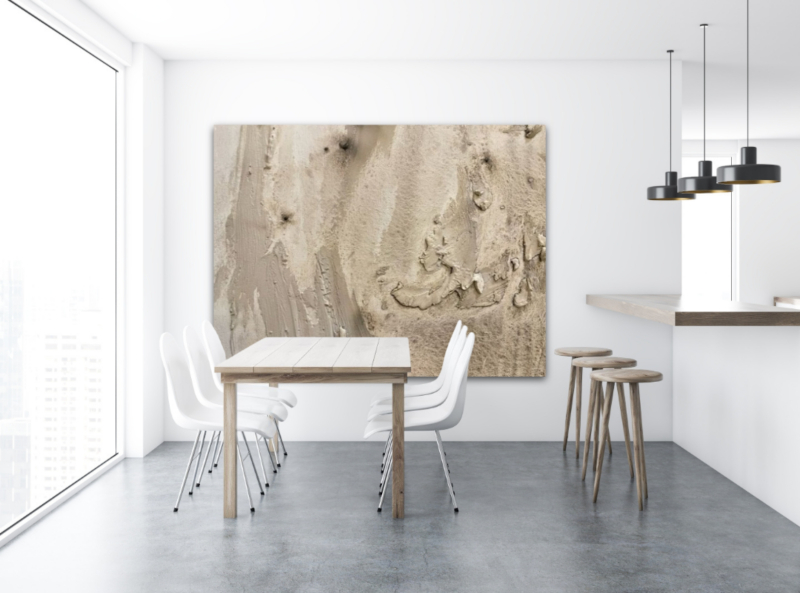
Preview Art on Wall: See How Artwork Looks in Your Space
Choosing artwork online can be difficult for one simple reason: a flat image does not show you how the piece will actually feel in your room. Being able to preview art on your wall before buying or hanging it can make size, placement and style much easier to judge.
Artists face the same problem from the other side. A potential buyer may love a painting but still hesitate because they cannot imagine how large it will look above a sofa, whether the colours will work in their home or which frame will suit the space.
Digital art visualization reduces that uncertainty by letting artwork be seen in context before anything is purchased, framed or hung.
Why Preview Art on a Wall Before You Buy?
Artwork dimensions can be surprisingly difficult to interpret. Knowing that a painting is 80 × 100 cm does not necessarily tell you how dominant it will feel on a particular wall.
A realistic wall preview can help you:
- understand the artwork's scale in relation to furniture and the room;
- compare different sizes and placements;
- see whether the colours work with the surrounding interior;
- consider different framing options;
- compare several artworks before making a decision; and
- feel more confident before buying or hanging a piece.
Two Ways to Visualize Artwork on a Wall
Two particularly useful approaches are creating a polished room mockup and previewing artwork on a real wall with augmented reality. They solve slightly different problems.
1. Use a Realistic Room Mockup
A room mockup places artwork into a prepared interior. It is useful for artists who want professional images for websites, portfolios, social media and online listings, because the same artwork can be presented in different interior styles without arranging a physical photoshoot.
Context also helps viewers understand scale. An artwork shown above a sofa or console table communicates its proportions much more intuitively than an isolated image.
Our guide to art mockups for artists explains how realistic mockups can support online presentation and sales.
2. Preview Artwork on Your Actual Wall With AR
Augmented reality is different from a prepared mockup. Instead of showing the artwork in a styled interior, AR lets a viewer visualize the piece on a real wall through a compatible device.
This is particularly useful when the question is not simply “Does this artwork look good?” but “Will it work here?” A buyer can evaluate the artwork against their own furniture, wall colour and available space.
For artists, this gives potential collectors another way to explore a piece before purchasing. Read more in our guide to augmented reality for artists.
Help People See Your Artwork in a Space
With InsituArtRoom, artists can create realistic artwork mockups for online presentation and use visualization tools to help viewers understand how a piece can look in context.
You can start with 9 free interiors. Premium gives you access to the full interior collection for much more variety when presenting your artwork.
How to Preview Art on a Wall More Accurately
Use the Correct Artwork Dimensions
Scale is one of the most important parts of a useful preview. Work from the real dimensions of the artwork rather than simply resizing it until the composition looks attractive.
Pay Attention to Perspective
If the wall is photographed at an angle, the artwork needs to follow the same visual plane. Otherwise, even a beautifully styled image can look artificial.
InsituArtRoom's Perspective Mode helps artists adjust artwork to match the angle of the wall more naturally.
Consider the Frame
A frame changes both the appearance and the overall visual size of a piece. Testing different frame styles, mat options or a frameless presentation can help you decide what suits the artwork and room.
Compare More Than One Placement
Do not assume the centre of the wall is automatically the best position. Try the artwork at different heights and in relation to nearby furniture. Small placement changes can significantly affect how balanced a wall feels.
Why Wall Previews Matter for Artists Selling Online
When art is sold online, buyers cannot experience it physically before purchasing. That creates uncertainty around size, colour, framing and placement.
Strong presentation cannot replace the artwork itself, but it can answer practical questions that a simple product photograph cannot. This is one reason contextual presentation can help build buyer confidence.
Our article on what makes people buy art online looks more closely at the role of trust, presentation and visualization in online art purchases.
Use Wall Previews in Your Marketing
A wall preview is useful beyond the buying decision. Artists can reuse realistic presentations across social media, websites, portfolios, newsletters and marketplace listings.
One artwork can be shown in several interiors, with different frames or against different wall colours. That gives you more content without requiring a new physical photoshoot for every post.
If you regularly need new ways to present existing work, see our 30 social media content ideas for artists.
Mockup or AR: Which Should You Use?
You do not necessarily need to choose one. They are useful at different stages.
- Use mockups when you want polished images for marketing, portfolios, listings and social media.
- Use AR when you want someone to visualize the artwork directly in their own space.
For artists selling online, using both can create a stronger journey: first attract attention with professional presentation, then give an interested buyer a way to imagine the artwork at home.
Final Thoughts
Being able to preview art on a wall removes some of the guesswork from choosing and presenting artwork. Buyers can better understand scale and placement, while artists can show their work in context instead of relying only on isolated artwork images.
Whether you use a realistic room mockup, augmented reality or both, the aim is the same: help people move from simply looking at an artwork to imagining what it could look like in a real space.
Create Your Own Artwork Preview
Use InsituArtRoom to present your artwork in realistic interiors and create professional visuals for your portfolio, social media and online sales.