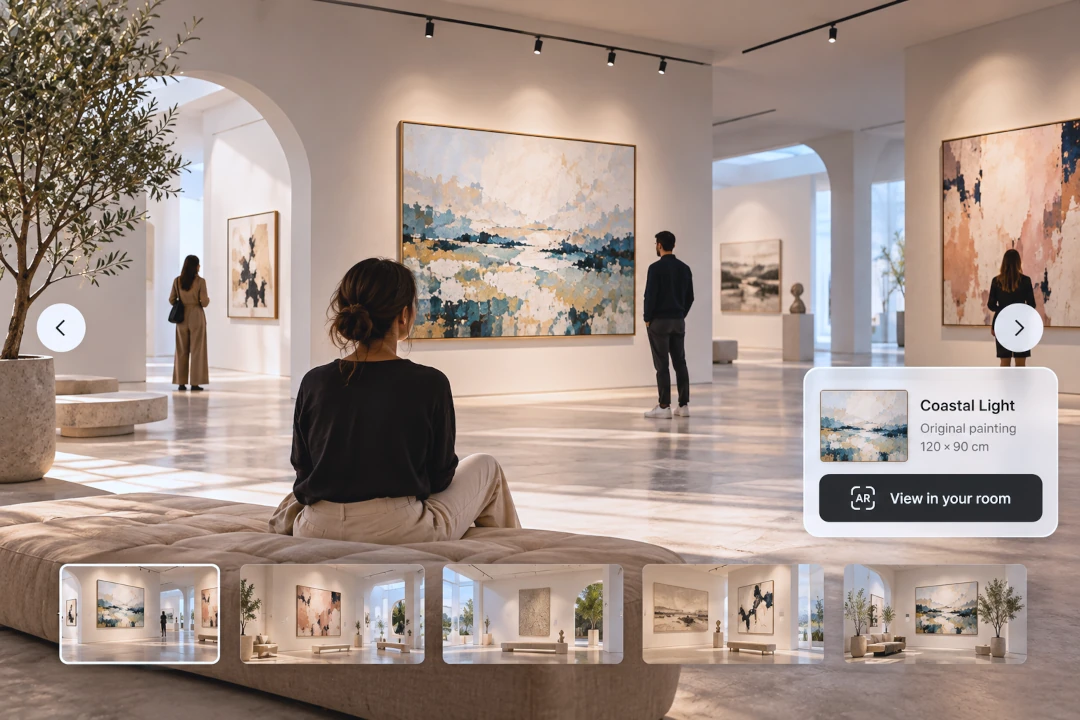
Virtual Art Exhibitions: A Practical Guide for Artists
A virtual art exhibition gives artists a way to present a group of works as a connected experience without depending on a physical gallery. It can introduce a new collection, support an online launch, reach collectors in different countries or simply give your work more context than a standard portfolio page.
But a successful virtual art exhibition is more than a folder of artwork images. The selection, sequence, presentation and supporting information should work together so that visitors understand what they are looking at and want to continue exploring.
This practical guide explains how to plan, present and promote an online exhibition, including ways to use realistic interior mockups, Reels and augmented reality to make the experience more engaging.
What Is a Virtual Art Exhibition?
A virtual art exhibition is a curated presentation of artwork that people can experience online. It may be hosted on an artist's own website, a dedicated exhibition page, an online gallery platform or another digital space.
The format can be simple or elaborate. You do not necessarily need a fully navigable 3D gallery. A carefully designed page with strong artwork images, contextual displays, descriptions and a clear exhibition sequence can often provide a cleaner and more accessible experience.
1. Start With a Clear Exhibition Idea
Before choosing a platform or designing the exhibition, decide what connects the works.
Your exhibition might focus on a new series, a particular subject, a period of your practice, a shared material or technique, or a broader theme. A clear concept helps you decide which pieces belong and which do not.
Try to describe the exhibition in one or two sentences. If that is difficult, the concept may still be too broad.
2. Curate the Artwork Instead of Showing Everything
A virtual exhibition does not need to include every work you have available. Strong curation can make individual pieces feel more significant and help visitors understand the relationship between them.
Choose enough work to develop the idea without overwhelming the viewer. Look for variation in scale, colour, composition or intensity while maintaining a coherent overall experience.
3. Decide the Order of the Works
Sequence matters online just as it does in a physical exhibition. Think about the first artwork visitors see, how the exhibition develops and which work should provide the final impression.
A powerful piece can open the exhibition, while quieter or more detailed works can create pauses. Avoid ordering works only by date or size unless that sequence supports the exhibition concept.
4. Photograph or Digitise Every Artwork Properly
The quality of your exhibition depends heavily on the quality of the source images. Artwork should be sharp, evenly lit and represented with accurate colour.
Crop unnecessary surroundings from the main artwork image and correct obvious perspective distortion. Keep high-resolution originals so you can create different versions for the exhibition, social media and promotional material.
For practical guidance, see How to Photograph Artwork.
5. Create a Consistent Visual Presentation
Consistency makes an online exhibition easier to navigate. Artwork images do not all need to have identical proportions, but spacing, typography, captions and background treatment should feel intentional.
Avoid switching randomly between very different image treatments. The artwork should remain the focus rather than competing with the design of the page.
6. Show Selected Works in Realistic Interiors
A clean artwork image shows the piece accurately, while an interior mockup answers a different question: what could this artwork feel like in a real space?
With InsituArtRoom, artists can place their work in realistic interiors, adjust its size and position, and experiment with frames and mats. There are 9 free interiors to get started, while Premium gives access to the wider interior collection.
You do not need to create a mockup for every artwork. Use contextual displays strategically for key works, larger pieces or sections where you want to change the visual rhythm of the exhibition.
Create Exhibition Images Without Staging a Physical Gallery
Use InsituArtRoom to place your artwork in realistic interiors, test different presentations and create visual material for your virtual exhibition and its promotion.
Try InsituArtRoom7. Keep Scale Believable
One advantage of displaying art in an interior is that viewers gain a visual reference for size. That advantage disappears if the artwork is shown at an unrealistic scale.
Use the actual dimensions of the piece as your guide. If an artwork is small, allow it to look small. Accurate presentation helps potential buyers understand the work and builds trust.
Perspective matters too. Artwork placed on an angled wall should follow the plane of that wall rather than appearing pasted on top of the image.
8. Give Each Artwork the Information It Needs
Visitors should not have to search for basic details. Depending on the type of work, include:
- Title.
- Artist name, particularly for group exhibitions.
- Year.
- Medium.
- Dimensions.
- Edition information where relevant.
- Availability or sales status.
- Price or a clear route for enquiries, if the work is for sale.
If you need help with the text accompanying individual pieces, see How to Write an Artwork Description.
9. Write a Short Exhibition Introduction
The introduction should help visitors enter the exhibition without explaining every artwork for them. Give enough context to establish the theme, motivation or question behind the collection.
Keep it readable online. A few focused paragraphs are often more useful than a long academic statement, especially when the exhibition is aimed at a broad audience or potential buyers.
10. Include Information About the Artist
Someone discovering your exhibition may know nothing about you. Include a concise artist biography or link to a dedicated bio page so visitors can understand your background and practice.
Our guide to writing an artist bio can help you structure this information.
11. Make the Exhibition Easy to Navigate
Online visitors are less patient with confusing navigation than people who have physically travelled to a gallery. Keep the route through the exhibition simple.
Use clear sections and predictable controls. If the exhibition contains several series or rooms, tell visitors where they are and how to move between them.
Also check the experience on a phone. Many people will discover your exhibition through social media and open it on a mobile device first.
12. Decide Whether the Exhibition Is Also a Sales Space
An exhibition can be purely presentational, but if the works are available for purchase, make that clear.
Each available piece should have an obvious next step. That might be a purchase button, a link to a marketplace listing or a simple enquiry route.
For broader selling strategies, see How to Sell Art Online and Where to Sell Art Online.
13. Let Potential Buyers Preview Art on Their Own Walls
Interior mockups show the artwork in a prepared environment. Augmented reality can make the experience more personal by allowing viewers to visualise a piece in their own space.
InsituArtRoom's View in your room feature lets viewers preview artwork on a real wall using AR. For an online exhibition, this can be particularly valuable when a visitor becomes interested in a specific piece and wants to judge its scale or placement at home.
Learn more in Augmented Reality for Artists.
14. Create Promotional Content Before Launch
Do not wait until the exhibition is live to start talking about it. Build a small collection of promotional assets in advance.
These might include cropped artwork details, installation-style mockups, artist studio images, exhibition previews, short videos and countdown Stories.
Preparing this material early makes it easier to maintain momentum during the launch instead of creating everything at the last minute.
15. Turn Exhibition Images Into Reels
Reels can introduce the exhibition to people who may never encounter the exhibition page directly.
InsituArtRoom can turn artwork presented in interiors into vertical Reels using effects such as Zoom In, Zoom Out and Bird's Eye. You can use different works from the exhibition to create a short promotional sequence or several individual posts.
For more ideas, see How to Make Art Reels for Instagram.
16. Promote the Exhibition Across More Than One Channel
Instagram may be an important source of visitors, but it should not necessarily be the only one. Depending on your audience, you can also promote the exhibition through your website, mailing list, portfolio, other social platforms and relevant art communities.
Give people a direct link to the exhibition rather than making them search for it.
17. Keep the Exhibition Available After the Launch
A physical exhibition has closing dates because the venue must eventually change. A virtual exhibition does not have the same limitation.
Unless there is a reason to remove it, consider keeping the exhibition online as an archive after the main promotional period. It can continue to attract visitors through search, links, social posts and your portfolio.
Virtual Exhibition or Online Portfolio?
They serve different purposes. A portfolio usually represents your broader practice and may contain work from different periods or collections. A virtual exhibition is more tightly curated around a particular idea, series or event.
An artist can benefit from both. Your portfolio introduces your overall work, while individual exhibitions provide deeper experiences around selected collections.
See How to Make an Art Portfolio for the broader portfolio approach.
Do You Need a 3D Virtual Gallery?
No. A 3D environment can be useful when spatial exploration is central to the project, but it is not automatically better.
A simpler exhibition page may load faster, work better on mobile and make individual artworks easier to inspect. Choose the format that serves the art and your audience rather than adding technology simply because it is available.
Can You Create a Virtual Exhibition Without a Gallery?
Yes. Independent artists can organise an online exhibition using their own website or other digital platforms without being represented by a physical gallery.
The important elements are curation, strong images, clear information, coherent presentation and a straightforward way for visitors to learn more or enquire about the work.
A Simple Virtual Art Exhibition Workflow
- Choose the exhibition concept.
- Select and sequence the artworks.
- Photograph or digitise each piece.
- Prepare titles, dimensions, media and descriptions.
- Create contextual mockups for selected works.
- Build the exhibition page or digital space.
- Add artist and exhibition information.
- Test the exhibition on desktop and mobile.
- Prepare promotional posts and Reels.
- Launch and share a direct link.
- Make sales or enquiry routes easy to find.
- Keep the exhibition online as an archive when appropriate.
Common Virtual Exhibition Mistakes
- Including too many artworks without a clear curatorial reason.
- Using inconsistent or low-quality artwork images.
- Making the technology more important than the art.
- Showing artwork at unrealistic scale.
- Leaving out dimensions, media or availability.
- Creating confusing navigation.
- Ignoring the mobile experience.
- Launching without promotional material ready.
- Giving interested buyers no clear next step.
Build Stronger Visuals for Your Online Exhibition
With InsituArtRoom, you can create realistic interior presentations, experiment with frames, produce Reels and give viewers an AR option for visualising artwork on their own walls. Start with 9 free interiors and explore the wider Premium collection when you need more presentation options.
Explore InsituArtRoomFinal Thoughts
A virtual art exhibition can be much more than a substitute for a physical show. It gives artists the freedom to curate work for a global audience, keep exhibitions accessible for longer and connect presentation directly with portfolios, social media and online sales.
Start with the art and the exhibition idea. Then use digital tools where they genuinely improve the experience: strong photography for accuracy, realistic mockups for context, Reels for promotion and AR when viewers want to imagine a work in their own space.
The result should still feel like an exhibition, not simply a collection of files on a webpage.