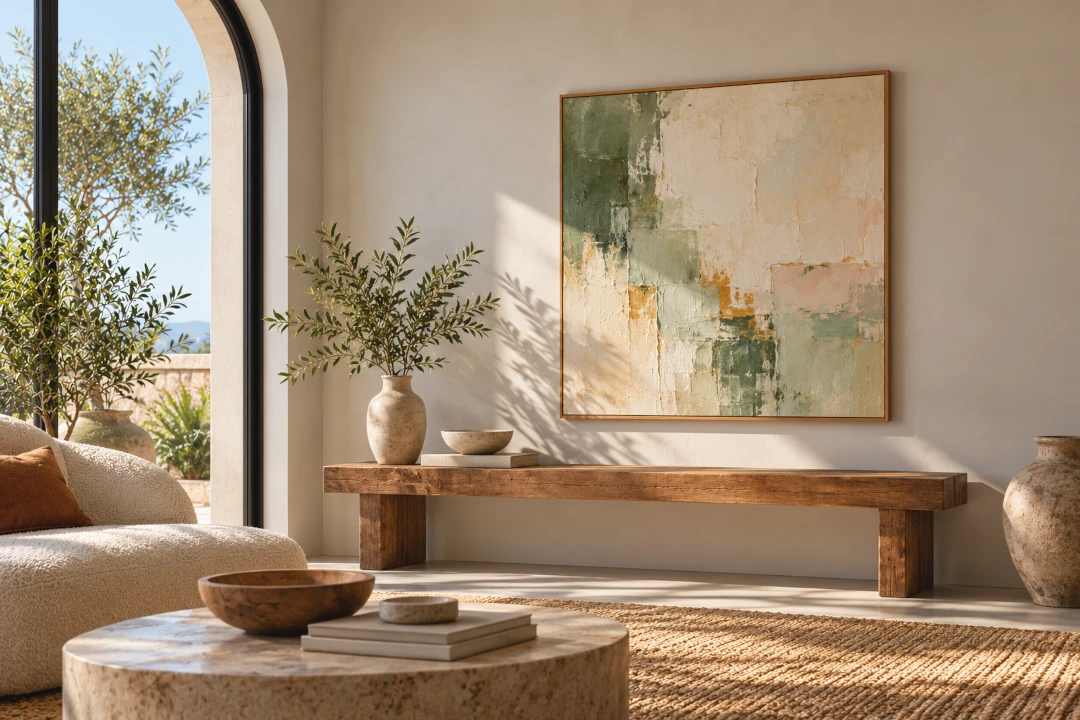
How to Make a Painting Mockup Online
A painting mockup lets you show your artwork in a realistic interior before it is physically hanging there. Instead of sharing only a flat photograph of a painting, you can place it above a sofa, console, bed or desk and give viewers an immediate sense of how the piece could look in a real home.
You do not need to photograph every painting in a styled room or spend time building scenes in Photoshop. With an online art mockup tool, you can upload your painting, choose an interior, adjust the artwork and create a professional presentation in minutes.
Create a Painting Mockup for Free
Upload your painting and try it in 9 interiors for free with InsituArtRoom.
Create Your Painting Mockup →What Is a Painting Mockup?
A painting mockup is a visual preview that places an image of your painting into an interior or onto a wall. It helps transform a standalone artwork photograph into an image that shows the painting in context.
Artists use painting mockups for online portfolios, websites, social media, sales pages, presentations and conversations with potential buyers. They are especially useful when photographing every artwork in a real interior is impractical.
How to Make a Painting Mockup Online
- Photograph or scan your painting. Start with a clear, straight image with even lighting and accurate colours.
- Upload the artwork. Add your painting to your chosen art mockup tool.
- Choose an interior. Select a room that suits the style, colours and intended audience of the painting.
- Place the painting on the wall. Position the artwork where it would naturally hang in the room.
- Adjust the size and perspective. Use furniture and architectural details as references so the painting looks believable in the space.
- Add a frame if appropriate. Test framed and unframed versions without physically reframing the artwork.
- Save the finished mockup. Use it on your website, portfolio, social media or sales channels.
InsituArtRoom is designed specifically for this workflow. Artists can place their work in more than 1,500 interiors and experiment with frames, mats, positioning and presentation without building a mockup manually.
Why Use a Mockup for a Painting?
When people view art online, they cannot stand in front of the physical painting. They may know its dimensions, but measurements alone do not always communicate how large or small a piece will feel on a wall.
A room mockup gives the artwork context. Furniture, doors, windows and other elements help viewers understand its approximate scale and imagine how it could work in an interior.
For the artist, this also creates more useful marketing material from a single artwork image. One painting can be presented in several rooms and used across different platforms without organising a new photoshoot each time.
Choose the Right Interior for Your Painting
The best room is not necessarily the most dramatic one. The interior should support the painting rather than compete with it.
Think about the artwork's colours, style and scale. A large abstract painting may work well on a spacious contemporary wall, while a smaller figurative or floral piece may feel more natural above a console or in a more intimate setting.
Creating several versions can also be useful. Showing the same painting in different interiors gives viewers more than one way to imagine living with the artwork.
Make the Painting Look Realistic
A convincing mockup depends on more than choosing an attractive room. Pay attention to the relationship between the artwork and the space.
Use believable scale
Compare the painting with nearby furniture. If a 60 cm painting suddenly appears wider than a large sofa, the mockup will not communicate the artwork accurately.
Position it naturally
Consider where artwork would realistically hang. The centre of the painting, the distance from furniture and the amount of empty wall around it all influence whether the scene feels believable.
Match the wall perspective
If the wall is angled, the painting should follow that perspective. Perspective tools can help the artwork sit naturally within the room instead of appearing pasted over the photograph.
Should You Add a Frame to a Painting Mockup?
That depends on the artwork. Some paintings are intended to be displayed without a frame, while others benefit from one. A digital mockup lets you experiment before making that decision physically.
You can also create both versions. An unframed mockup can show the painting as it is sold, while a framed version can help a potential buyer imagine another presentation option.
Create Mockups for Different Painting Sizes
Painting mockups are particularly helpful when you work in several formats. A small artwork and a large statement piece should not be presented at the same apparent size simply because they fit into the same digital space.
Keeping the proportions believable helps viewers understand what they are considering and makes your online presentation feel more professional.
Use Painting Mockups for Your Portfolio
A portfolio does not have to consist entirely of isolated artwork photographs. Mixing clean images of the original paintings with selected room mockups can show both the work itself and how it interacts with a space.
For more ideas on building your presentation, see our guide to how to make an art portfolio.
Use Painting Mockups on Instagram and Social Media
Room mockups give you additional visual content without requiring a new artwork. You can show one painting in several interiors, compare framed and unframed versions or create a carousel that helps followers imagine the piece in different homes.
With InsituArtRoom, you can also create vertical Reels from your artwork presentations, turning a static painting into content designed for social media.
Let Collectors See the Painting in Their Own Room
A polished mockup shows your painting in a carefully selected interior. Augmented reality adds another layer by letting viewers preview artwork in a real space through a compatible device.
InsituArtRoom's View in your room AR feature can help potential buyers visualise an artwork in their own surroundings after discovering it through your mockups, portfolio or social content.
Can You Make a Painting Mockup for Free?
Yes. InsituArtRoom includes 9 free interiors, so you can upload a painting and start creating mockups before deciding whether you need Premium.
Artists who create mockups regularly can access a much larger collection of interiors, making it easier to match different artworks with different styles of room and avoid using the same background repeatedly.
Painting Mockups Can Help You Sell Art Online
A mockup cannot replace a clear, accurate photograph of the original painting. Buyers should still be able to see the artwork itself and understand its real dimensions and details.
Instead, mockups complement those images. They answer a different question: What might this painting look like on a wall?
That makes them useful on artist websites, online shops, social media and marketplace listings. Artists can also list original works in the InsituArtRoom Marketplace.
Create Your Painting Mockup Online
You do not need a styled home, a professional interior photoshoot or advanced Photoshop skills to create a strong presentation for your paintings.
Start with a good image of the artwork, choose an interior that complements it, keep the scale realistic and experiment with different rooms and frames. A simple painting photograph can quickly become a professional image ready for your portfolio, website and social media.
Turn Your Painting Into a Professional Mockup
Start with 9 free interiors, then explore 1,500+ rooms, frames, mats, Reels, AR and more.
Try InsituArtRoom →