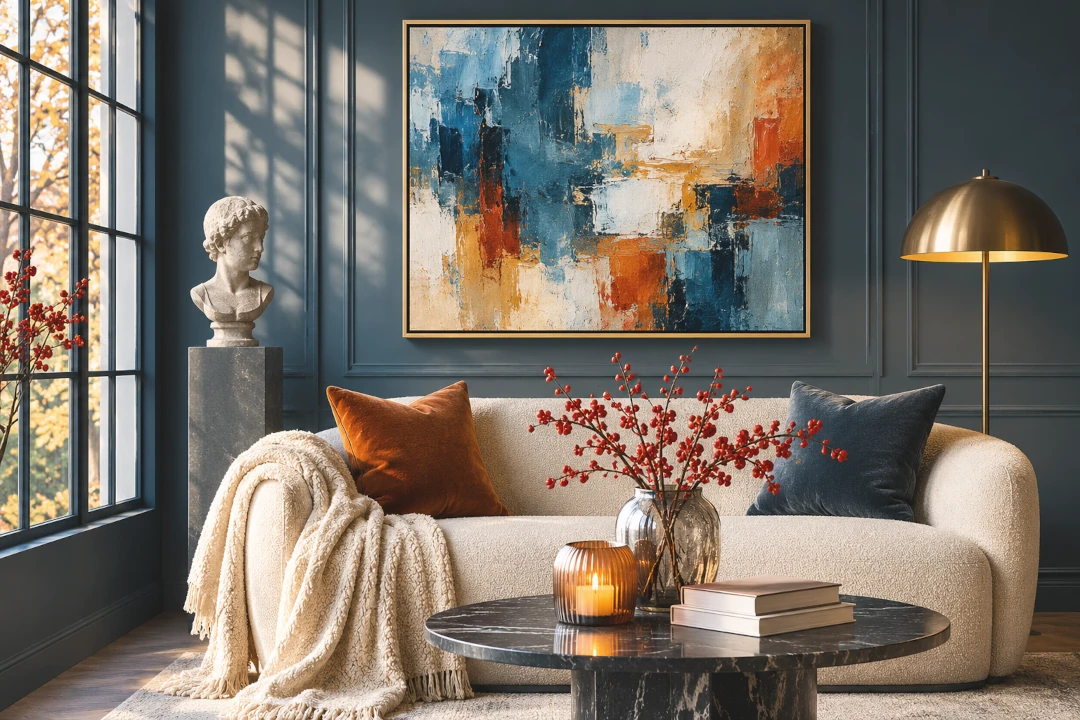
How to Create Art Mockups for Saatchi Art Listings
Collectors browsing Saatchi Art cannot always stand in front of a painting before deciding whether it belongs in their home. Accurate photography introduces the work itself, while a realistic art mockup can help explain its scale, proportions and presence in a room.
This guide explains how to create art mockups for Saatchi Art listings and use them alongside photographs of your original artwork, wherever the marketplace permits contextual images.
Create a Free Art Mockup
Upload your artwork and explore 9 free interiors with InsituArtRoom.
Create Your Art Mockup →Why Room Mockups Matter When Selling Original Art
A photograph against a plain background shows composition and colour, but it provides few clues about physical size. A collector considering a large canvas may want to understand how much wall space it occupies. A smaller work may need a more intimate setting to communicate its character.
Room mockups help bridge this gap. They are particularly useful for artists who sell internationally and cannot arrange an in-person viewing for every potential collector.
How to Create Art Mockups for Saatchi Art Listings
- Photograph the original artwork. Use even light, a straight camera angle and accurate colour. Crop away unwanted surroundings without removing the artwork's edges.
- Upload the image to InsituArtRoom. Start with the highest-quality photograph available.
- Choose an interior. Select a wall and surrounding furniture that complement the work without distracting from it.
- Adjust scale and placement. Match the proportions of the physical artwork and use furniture as a visual reference.
- Consider framing. Show the actual frame if applicable, or make clear that a simulated frame is not included.
- Export your presentation. Choose a high-resolution export and check the image at full size before using it.
Build an Image Set That Answers Collectors' Questions
Different images serve different purposes. Start with a straight-on photograph of the entire work, then prepare close-ups of texture, brushwork or surface details. Photograph the sides and back when these are relevant to the purchase. A contextual room preview can complement this set where permitted.
Read our guide to photographing artwork for more advice on capturing the original piece accurately.
Show the Correct Artwork Size
Imagine an original painting measuring 60 × 80 cm. Displaying it across nearly the entire width of a three-metre sofa would give a misleading impression. Instead, keep the painting proportionate to familiar objects and include the actual dimensions in the listing.
For a very small work, try a console table or reading corner rather than an enormous empty wall. For large-scale art, select an interior with sufficient wall space and clear architectural references.
Choose Interiors That Suit the Artwork
Consider the palette, subject and visual energy of the piece. A colourful abstract painting may stand out against a restrained wall, while a quiet landscape may benefit from a room with subtle textures. Sculptural or heavily textured paintings still need real detail photographs, because a flat digital mockup cannot reproduce their physical surface.
With more than 1,500 interiors in InsituArtRoom, artists can experiment with different settings before choosing a presentation. Our living room wall art mockup guide explores these decisions in more detail.
Keep Framing and Artwork Details Accurate
A digital frame can help collectors imagine a finished presentation, but it should never imply that a frame is included when the artwork is sold unframed. Describe the medium, dimensions and framing status clearly. Avoid filters that change the original colours or contrast.
Connect Your Mockups to Your Artist Profile
The same room preview can support your portfolio, artist website and Instagram content. Use a clear link to the relevant artwork when promoting a piece that is available through Saatchi Art. When a work sells, update your promotional content to reflect its availability.
For more ideas, explore our guides to displaying art online and creating art Reels.
Can You Create Saatchi Art Mockups for Free?
Yes. InsituArtRoom offers 9 free interiors to help you get started. You can experiment with placement and presentation before deciding whether the larger Premium collection suits your workflow.
Frequently Asked Questions
Can I use a mockup as my main Saatchi Art image?
Use a clear photograph of the actual artwork as your primary image and follow the marketplace's current image requirements. Treat simulated interiors as complementary marketing material rather than replacements for original photographs.
Do I need Photoshop to create art mockups?
No. A dedicated art visualization app lets you place an artwork image into an existing interior without building a room scene from scratch.
Can a mockup help collectors understand scale?
Yes, provided that the artwork is shown at believable proportions. Always include exact physical dimensions alongside the image.
Present Your Original Art With Confidence
Professional presentation starts with faithful photography. By combining it with thoughtfully selected room previews, you can help collectors understand both the artwork itself and how it might feel in a real home.
Create Your Next Art Mockup
Try 9 interiors for free and explore 1,500+ rooms, frames, mats, Reels and AR with InsituArtRoom.
Try InsituArtRoom →