Art Mockup App for Artists: 10 Reasons to Use One
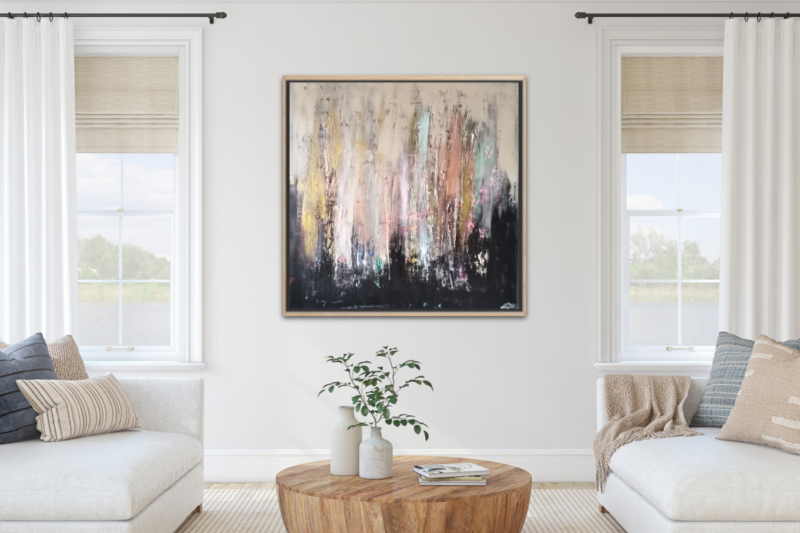
An art mockup app can turn a simple photograph of your artwork into a professional presentation that shows the piece in context. Instead of asking potential buyers to imagine how a painting or print might look on a wall, you can show them.
For artists working online, that can be useful far beyond a single mockup. The same artwork can become a portfolio image, an interior presentation, a social media post, a Reel or an augmented reality experience.
Here are ten practical reasons artists use mockup apps and how to get more value from them without replacing accurate photographs of the real artwork.
1. Show Your Artwork in a Realistic Space
A flat photograph shows the artwork itself, but it does not always communicate how the piece feels in a room. An art mockup app lets you place the work in an interior so viewers can see it alongside furniture, wall space and architectural features.
This gives the artwork visual context while keeping the presentation under your control. You can choose a setting that complements the work rather than depending on whatever wall happens to be available when you photograph it.
For a deeper look at contextual presentation, see our guide to art mockups for artists.
2. Help Buyers Understand Artwork Scale
Dimensions are essential on a sales page, but many people find it difficult to visualise measurements without a familiar reference. A room presentation can make the difference between a small print and a large statement painting much easier to understand.
The key is accuracy. Keep the artwork's real proportions and use believable scale. A mockup should help a buyer understand the piece, not make it look artificially larger for dramatic effect.
3. Create a More Professional Online Presentation
How you present your work affects the overall impression of your website, portfolio and sales listings. Clean, consistent visuals can make it easier for viewers to focus on the artwork and understand how it could be displayed.
Professional presentation does not mean every image must look identical. In fact, using the same room for every artwork can quickly become repetitive. Choose interiors and presentation styles that suit individual pieces while maintaining a consistent level of quality.
4. Build a Stronger Art Portfolio
Mockups can add useful context to an artist portfolio, particularly for work that is intended to live on a wall. They can demonstrate scale and presentation without requiring every artwork to be physically installed and photographed in a different location.
Use them selectively. A strong portfolio should still include clear images of the actual work. Combine clean artwork photography, detail shots and a smaller number of contextual presentations.
See how to make an art portfolio for a complete guide.
5. Create More Social Media Content From One Artwork
Artists often need to promote the same piece more than once, but reposting the identical image can make a feed feel repetitive. Mockups give you another way to show the work.
One painting could appear as a clean artwork photograph, a living room mockup, a close-up detail, a framed presentation and a short video. This gives you several pieces of content without requiring several new artworks.
For a wider social strategy, read our guide to Instagram for artists.
6. Turn Artwork Presentations Into Reels
Static mockups are only one option. InsituArtRoom also lets artists create vertical video content from artwork presentations using motion effects such as Zoom In, Zoom Out and Bird's Eye.
This can be useful when you want to turn one artwork into several social formats without filming an elaborate video production.
For practical ideas, see how to make art Reels for Instagram.
7. Save Time Compared With Staging Multiple Photo Shoots
Creating a different physical installation for every artwork can require access to suitable rooms, moving furniture, hanging work, lighting the space and photographing the result.
A mockup app makes it possible to test several environments digitally from one good artwork image. That is especially useful for artists who regularly release new work or need frequent promotional content.
This does not eliminate the value of photographing the real artwork. Start with an accurate source image, then use digital presentations to extend what you can create from it. See how to photograph artwork for guidance.
8. Test Different Interiors and Frames
The same artwork can feel very different depending on its surroundings. Trying several rooms can help you discover which presentation best supports the work.
You can also explore framing options. InsituArtRoom includes presentation choices such as metal frames, floating frames and cream mats, giving you more ways to experiment visually before creating marketing content.
Remember to distinguish between presentation inspiration and what a buyer actually receives. If a work is sold unframed, make that clear in the sales information even when a mockup shows a frame.
9. Support Online Art Sales
Buying art online involves uncertainty. A potential buyer cannot stand in front of the work, compare it directly with their wall or experience its physical presence before purchasing.
A realistic room mockup can answer some practical questions about scale and context. It works best alongside accurate photographs, dimensions, medium, price, framing information and a clear artwork description.
If selling online is your goal, read how to sell art online, how to price your artwork and how to write an artwork description.
10. Let Viewers Visualise Art on Their Own Wall With AR
Prepared mockups show your artwork in an interior selected by you. Augmented reality goes a step further by allowing viewers to visualise the work in their own environment.
InsituArtRoom's View in your room feature lets artwork be viewed on a real wall through AR. This gives interested viewers another way to explore whether a piece could work in their space.
Learn more in our guide to augmented reality for artists.
Try an Art Mockup App With Your Own Artwork
InsituArtRoom lets you upload your artwork, place it in curated interiors, adjust its presentation and create professional visuals for your portfolio, website and social media. You can start with 9 free interiors.
Try InsituArtRoomHow Does InsituArtRoom Work?
The workflow is designed around artists rather than general graphic design. Upload your artwork, choose an interior, position the work and adjust the presentation to suit the piece.
InsituArtRoom includes 9 free interiors. Premium gives access to the larger interior collection, providing more settings for different artwork styles and marketing needs.
From there, you can create room presentations, explore framing, generate social content and use AR to help viewers visualise artwork in their own environment.
Art Mockup App vs General Photo Editor
You can create artwork mockups manually in general image-editing software, but that often means sourcing room images, masking frames, adjusting perspective and repeating the process for every presentation.
A dedicated art mockup app simplifies that workflow because the presentation environment is already designed around displaying artwork. For artists who create mockups regularly, that can make the process much faster.
If you want to understand the workflow in more detail, read our guide to using an art mockup tool.
When Should You Not Use a Mockup?
A mockup should not be your only image when accuracy matters. Buyers should still be able to see the actual artwork clearly.
Do not use a room presentation to hide poor artwork photography, misrepresent dimensions or imply that a frame is included when it is not. Mockups are most useful as additional context.
Choose the Right Interior for Your Artwork
The room should complement the artwork without becoming the main subject. Consider colour, wall space, furniture, lighting and the visual character of the piece.
You can also choose settings according to where a buyer might realistically display the work. Explore our guides to living room wall art mockups, office wall art mockups and dining room wall art mockups.
Common Art Mockup App Mistakes
- Stretching or changing the artwork's proportions
- Making the artwork unrealistically large
- Using a low-quality source photograph
- Choosing interiors that distract from the art
- Using the same room for every piece
- Relying on mockups instead of showing the real artwork
- Using frames that could confuse buyers about what is included
- Adding too many effects to social media presentations
What Should You Look for in an Art Mockup App?
A useful app should make it easy to create believable presentations without requiring advanced design skills. Look for:
- A varied collection of interiors
- Easy artwork positioning and scaling
- Realistic framing and presentation options
- High-quality exports for marketing
- Social media formats
- Video or Reel creation if you use short-form content
- AR if you want viewers to visualise art in their own space
- A workflow that is fast enough to use regularly
Art Mockup App Checklist
- Photograph the artwork accurately first
- Keep its real proportions
- Use believable scale
- Choose an interior that suits the piece
- Keep the artwork as the visual focus
- Combine mockups with real artwork images
- Vary your settings across different posts
- Use the resulting visuals across your portfolio and marketing
- Make sales information clear and accurate
Create Professional Artwork Presentations
Turn your artwork into realistic room mockups, social content, Reels and AR experiences with InsituArtRoom.
Create Your First MockupFinal Thoughts
An art mockup app is useful because it helps artists get more from the artwork images they already have. One piece can become a realistic room presentation, portfolio visual, social post, Reel and interactive AR experience.
The best results come from using mockups honestly and strategically. Start with accurate artwork photography, preserve the real proportions, use believable scale and choose interiors that support rather than overpower the work.
Used alongside strong descriptions, clear pricing and professional portfolio images, mockups can become a practical part of how you present and promote your art online.