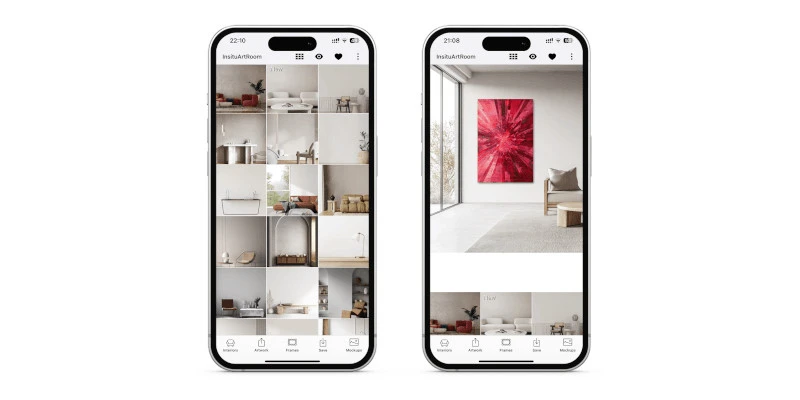
Art Mockup Tool for Artists: Present Your Artwork Professionally
An art mockup tool lets you show your artwork in a realistic setting without arranging a new photo shoot for every piece. Instead of presenting a painting or print only as a flat image, you can place it on a wall, adjust its size and position, explore different interiors and create visuals that help people understand how the work could look in a real space.
For artists selling and promoting work online, that context matters. A buyer viewing a digital image may understand the colours and composition but still struggle to imagine the artwork at home. A well-made art mockup can communicate scale, atmosphere and presentation much more quickly.
In this guide, we explain what an art mockup tool does, when artists should use one, how to create more convincing artwork mockups and how InsituArtRoom can help you turn one artwork image into professional content for your portfolio, website and social media.
What Is an Art Mockup Tool?
An art mockup tool is software that allows you to place a digital image of your artwork into a prepared scene, such as a living room, gallery, bedroom, office or dining room. The resulting image shows the artwork in context rather than in isolation.
Artists can use these previews to present paintings, prints, illustrations, photography and other wall-based work more professionally online. A mockup is not a replacement for accurate artwork photography. Instead, the two formats serve different purposes: the photograph documents the actual work, while the mockup helps viewers visualise how it might look when displayed.
If you want a broader introduction to this type of presentation, see our guide to art mockups for artists.
Why Use an Art Mockup Tool?
Online buyers cannot stand in front of an artwork, walk around it or compare it directly with furniture and architectural features. Contextual images can reduce some of that uncertainty.
An effective artwork mockup can help you:
- Show how large or small an artwork appears in a room
- Give buyers visual context before purchasing
- Create more polished portfolio and website images
- Produce varied content for Instagram and other social platforms
- Present the same artwork in different interior styles
- Explore framing and presentation options
- Create marketing visuals without staging a physical room
Art Mockups Help Buyers Understand Scale
Dimensions written in a product description are essential, but numbers alone do not always communicate visual impact. A 100 cm painting and a 40 cm print create very different impressions on the same wall.
Placing the work in an interior gives the viewer familiar reference points such as a sofa, table, doorway or bed. This can make the size easier to understand at a glance.
Accuracy is important. A mockup should not make an artwork appear dramatically larger or smaller simply to make the image more impressive. Use the artwork's real proportions and aim for a believable relationship between the piece and its surroundings.
Use Mockups Alongside Real Artwork Photos
A professional online presentation is strongest when different images answer different buyer questions.
Use accurate photographs to show the real artwork, colour, surface and details. Then use contextual mockups to demonstrate scale and how the piece might interact with an interior.
If you need to improve your source images first, read how to photograph artwork. A clean, well-lit photograph will also produce a better mockup.
How to Create a Realistic Art Mockup
1. Start With a Good Image of Your Artwork
Photograph or scan the work as accurately as possible. Keep the camera straight, avoid unwanted reflections and make sure the artwork is not distorted by perspective.
2. Keep the Original Proportions
Never stretch a square artwork into a rectangle or alter the proportions to fit a wall. The mockup should represent the work honestly.
3. Choose an Interior That Fits the Artwork
The room should support the artwork rather than compete with it. Consider the colours, architectural style, available wall space and overall mood.
A minimal work may benefit from a restrained interior, while a bold contemporary painting might work well against a darker or more expressive setting. There is no single correct style, but the artwork should remain the focus.
4. Set a Believable Size
Use the room's furniture and architectural details as visual references. If you know the real dimensions of the work, use them to guide the presentation rather than choosing scale purely for visual impact.
5. Position the Artwork Carefully
Check alignment, height and spacing. Artwork placed implausibly high, low or close to furniture can make an otherwise attractive mockup feel artificial.
6. Consider the Frame
If the artwork will be sold framed, show a presentation that resembles the actual framing when possible. If it is sold unframed, make that clear in your listing even if you use framed mockups for inspiration.
How InsituArtRoom Works as an Art Mockup Tool
InsituArtRoom is built specifically for artists who want to present their work in interiors without manually constructing every scene in image-editing software.
Upload your artwork, choose an interior, position and scale the work, and experiment with presentation options. InsituArtRoom includes 9 free interiors, while Premium gives access to the larger interior collection and additional presentation possibilities.
You can use the resulting visuals for portfolios, websites, social media, promotional material and online sales presentations.
Create an Art Mockup With Your Own Artwork
Upload your art to InsituArtRoom, choose an interior and create a professional room presentation in minutes.
Try InsituArtRoomUse Different Interiors for Different Artworks
One common mistake is using the same room for every piece. Even a good mockup can become repetitive when your entire portfolio uses an identical sofa, wall colour and composition.
Match the setting to the artwork and vary the visual language of your presentation. A large abstract painting, a delicate botanical print and monochrome photography do not necessarily need the same environment.
For more specific room ideas, explore our guides to living room wall art mockups, office wall art mockups and dining room wall art mockups.
Art Mockups for Your Portfolio
Your portfolio should show the artwork clearly first. Contextual mockups can then add variety and help viewers understand how selected pieces work at scale.
Do not fill the entire portfolio with staged interiors. Combine clean artwork images, detail shots and carefully selected mockups so galleries, clients and buyers can see both the work itself and its potential presentation.
For a complete portfolio structure, see how to make an art portfolio.
Art Mockups for Instagram and Social Media
A mockup gives you another visual format for artwork you may already have posted. Instead of repeatedly sharing the same flat image, you can show the piece in a room, compare interiors, reveal framing options or turn the presentation into short-form video content.
InsituArtRoom also lets artists create Reels using motion effects such as Zoom In, Zoom Out and Bird's Eye. For ideas and a practical workflow, read how to make art Reels for Instagram.
Art Mockups for Selling Art Online
When you sell art online, the mockup should support accurate product information rather than replace it. Buyers still need the title, medium, dimensions, price, framing information and clear photographs of the actual piece.
A contextual image can then answer another question: What could this artwork look like in a space?
That makes mockups especially useful on product pages, marketplace listings and promotional posts. For the wider sales process, see how to sell art online and our guide to writing an artwork description.
Mockups vs Augmented Reality
Mockups and augmented reality solve related but different problems. A mockup places the artwork into a prepared interior selected by the artist. AR lets a viewer visualise the artwork on a wall in their own environment.
That means you can use mockups to control how your art is presented in marketing, while AR can help an interested viewer explore how the piece might work in their personal space.
Learn more in our guide to augmented reality for artists.
Common Art Mockup Mistakes
- Stretching or distorting the artwork
- Making the artwork unrealistically large
- Choosing a room that overwhelms the work
- Using low-resolution artwork images
- Showing every artwork in the same interior
- Using mockups instead of photographs of the real piece
- Presenting a frame or display style without clarifying what the buyer actually receives
- Adding too many decorative elements around the artwork
What Makes an Art Mockup Look Professional?
The most convincing mockups usually feel simple. The artwork has the correct proportions, the scale is believable, the room complements the piece and there is enough visual space for the art to remain the focal point.
Professional presentation does not mean making the artwork look more expensive than it is. It means giving viewers a clear, attractive and useful way to understand the work.
Turn One Artwork Into More Marketing Content
Once you have a strong digital image of an artwork, you can use it in several ways: a clean portfolio image, multiple room mockups, a framed presentation, social posts, Reels and an AR experience.
This makes a mockup tool useful beyond a single image. It can become part of a repeatable content workflow for promoting new work.
Present Your Artwork in Realistic Spaces
Create room mockups, explore different interiors and turn your artwork into professional visual content with InsituArtRoom.
Create Your Art MockupArt Mockup Checklist
- Start with a high-quality image of the artwork
- Keep the original proportions
- Use believable scale
- Choose an interior that supports the artwork
- Check positioning and spacing
- Use accurate framing information
- Combine mockups with photographs of the actual work
- Vary interiors across your portfolio and social content
- Keep the artwork, not the room, as the main focus
Final Thoughts
A good art mockup tool helps bridge the gap between seeing an artwork as a digital image and imagining it as a physical object in a real space. For artists, that can improve portfolios, social content and online sales presentations without requiring a separate styled photo shoot for every piece.
The key is realism and clarity. Keep the artwork's proportions accurate, choose appropriate interiors, use believable scale and combine mockups with reliable photographs and complete artwork information.
With InsituArtRoom, you can create those contextual presentations from your own artwork and reuse them across the places where potential buyers discover your work.