Best Art Mockup Apps for Artists in 2026: 5 Tools Compared
The best art mockup app is not necessarily the same for every artist. Some tools are built specifically for placing artwork in realistic interiors, while others are broader design programs that also include mockup features.
If you sell art online, build portfolios or promote your work on social media, the right tool should do more than place an image on a wall. It should help you present scale convincingly, create polished content quickly and support the way you actually market your artwork.
Below, we compare five useful options for artists in 2026: InsituArtRoom, ArtPlacer, Smartist, ArtStage and Canva. Each has a different strength, so the best choice depends on what you need.
Best Art Mockup Apps at a Glance
| Tool | Best for | Key strengths |
|---|---|---|
| InsituArtRoom | Artists who want one workflow for presentation, content and selling | 1,500+ interiors, frames & mats, Reels, AR and an integrated art marketplace |
| ArtPlacer | Artists and galleries needing advanced presentation and website tools | Large room library, video mockups, personal spaces, AR, website integrations and virtual exhibitions |
| Smartist | Artists who want extensive mockup customisation | Photorealistic interiors, frames & mats, custom rooms, background removal and detailed scene controls |
| ArtStage | Apple users focused on polished artwork presentation | 1,000+ interiors, frames & mats, collections and HD exports |
| Canva | Artists who also need general graphic design and marketing tools | Broad mockup library, easy editing, social graphics and cross-device workflow |
Features can change over time. This comparison reflects publicly available product information checked in October 2026.
What Should Artists Look for in a Mockup App?
A good artwork mockup should make the art easier to understand, not distract from it. Before choosing a tool, consider whether you need:
- Realistic interiors designed for wall art
- Accurate-looking scale, placement and perspective
- Frames and mats
- Multiple artworks or gallery-wall arrangements
- High-quality exports for websites, portfolios and social media
- Video or Reel creation
- Augmented reality for viewing art in a real room
- A way to use your own room or a collector's space
- Tools that go beyond mockups, such as selling or website integrations
The most important question is not which app has the longest feature list. It is which one removes the most friction from your own workflow.
1. InsituArtRoom: Best All-in-One Option for Artists
Best for: Artists who want to create mockups, make promotional content, offer AR previews and sell artwork from the same ecosystem.
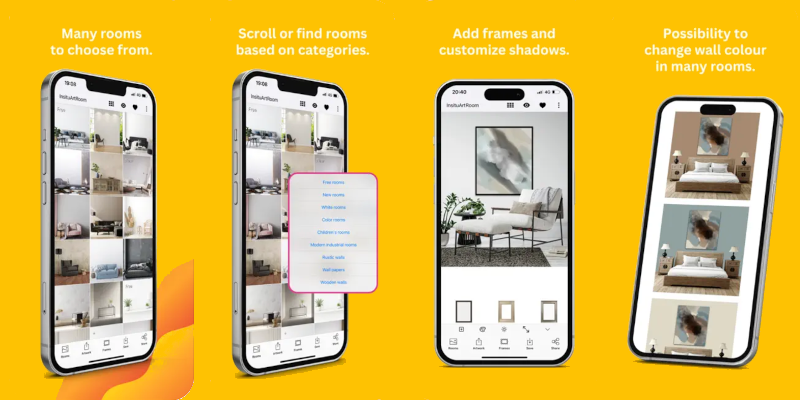
InsituArtRoom is built specifically around artwork presentation. Artists can upload their work and place it in more than 1,500 interiors, add frames and mats, create professional mockups and turn artwork presentations into vertical Reels.
Its View in your room AR feature gives viewers another way to understand an artwork by previewing it in a real space. Artists can also list original artwork for sale through the InsituArtRoom Marketplace, connecting the presentation side of the workflow with selling.
There are 9 free interiors to start with, while Premium unlocks the wider interior collection and additional features. This makes it possible to try the basic mockup workflow before subscribing.
Why choose it: InsituArtRoom is particularly useful when you do not just want a static wall mockup. It combines mockups, frames, Reels, AR and marketplace tools in a product designed around artists.
Create Your First Art Mockup
Upload your artwork, try 9 interiors for free and see how your work looks in a real setting.
Try InsituArtRoom →2. ArtPlacer: Best for Advanced Art Presentation and Gallery Tools
Best for: Artists, galleries and art professionals who need presentation tools that extend into websites, exhibitions and collector-facing experiences.
ArtPlacer is a dedicated art marketing and visualisation platform. Its current offering includes a large library of room mockups, video mockups, frames, Personal Spaces for using real-room photos, AR, website integrations, portfolio presentations and 3D virtual exhibitions.
That broader professional toolkit can be valuable for galleries and artists who want website widgets or exhibition-oriented features in addition to everyday mockups.
Why choose it: Strong choice when advanced presentation, website integration and virtual exhibition tools matter as much as creating social-media mockups.
3. Smartist: Best for Detailed Mockup Customisation
Best for: Artists who want substantial control over how an interior mockup looks.
Smartist focuses specifically on art visualisation. Its tools include photorealistic interiors, customisable frames and mats, wall and floor colour changes, multiple layouts, custom interiors and background removal for irregular-shaped artwork.
The free version provides a small selection of interiors and basic options, while Smartist Pro unlocks its broader content library and customisation tools.
Why choose it: A good fit when detailed visual customisation is the priority and you want a tool centred on creating artwork mockups.
4. ArtStage: Best for Apple Users Who Want Straightforward Art Staging
Best for: Artists using iPhone, iPad or compatible Mac computers who mainly want polished static presentation images.
ArtStage is an artwork presentation app with more than 1,000 photorealistic interiors. It supports paintings, prints, photography, illustrations and digital art, along with customisable frames and mats, collection arrangements and HD exports.
Its focus is deliberately narrower than an all-in-one marketing or sales platform. ArtStage states that it is an artwork presentation tool rather than an online marketplace or payment processor.
Why choose it: Useful for artists in the Apple ecosystem who primarily want to stage artwork professionally without needing a broader sales platform.
5. Canva: Best for Artists Who Also Need General Design Tools
Best for: Artists who want mockups alongside social posts, promotional graphics, presentations and other design work.
Canva is not an art-specific visualisation platform, but its Mockups feature can place uploaded images and designs into a broad range of templates. Canva also provides extensive editing, layout and social-media design tools, making it convenient when mockups are only one part of a larger content workflow.
Its mockup collection spans many product categories, including print, home and living, apparel, packaging and technology. That versatility is useful, although artists who primarily need realistic artwork-on-wall presentation may prefer a dedicated art tool.
Why choose it: Strong option if you already use Canva and want mockups integrated with a general-purpose design and marketing workflow.
Which Art Mockup App Is Best for You?
Choose based on the work you actually need to do. If you mainly want a flexible design platform that happens to include mockups, Canva may be enough. If detailed art visualisation is your priority, Smartist is purpose-built for that. ArtStage offers a focused option for Apple users, while ArtPlacer provides a broad professional toolkit for artists and galleries.
If you want to move from artwork → realistic mockup → Reel → AR preview → marketplace listing without piecing together several unrelated tools, InsituArtRoom is designed around that workflow.
Do You Need Photoshop to Create Art Mockups?
No. Photoshop remains a powerful option when you want precise manual control and are comfortable working with layers and Smart Objects, but dedicated mockup apps can remove much of that setup.
For many artists, speed matters. If the goal is to create several realistic presentations for a new artwork, a specialised app can be much faster than building every scene manually.
Are Free Art Mockup Apps Enough?
A free option can be enough when you only need an occasional mockup or want to test a workflow before paying. The trade-off is usually a smaller selection of interiors or fewer advanced features.
InsituArtRoom, for example, lets you start with 9 free interiors. If you create mockups regularly for portfolios, social media or sales listings, a larger library can help you avoid presenting every artwork in the same few rooms.
Why Art-Specific Mockup Apps Can Be Better for Artists
General mockup tools are designed for many kinds of products: clothing, packaging, screens, books and more. An art-specific tool starts from a different problem: how do you make a painting, print, photograph or illustration look believable on a wall?
That makes features such as artwork scale, framing, mats, room perspective, gallery arrangements and collector previews more central to the experience.
Final Thoughts
There is no single best art mockup app for every artist. The right choice depends on whether you value deep customisation, gallery tools, general graphic design, a focused Apple workflow or an all-in-one artist platform.
For artists who want more than a static mockup, InsituArtRoom combines realistic interiors with frames and mats, Reels, augmented reality and a marketplace where original artwork can be listed for sale.
See Your Art in a Real Interior
Start with 9 free interiors and create your first professional art mockup in minutes.
Try InsituArtRoom →