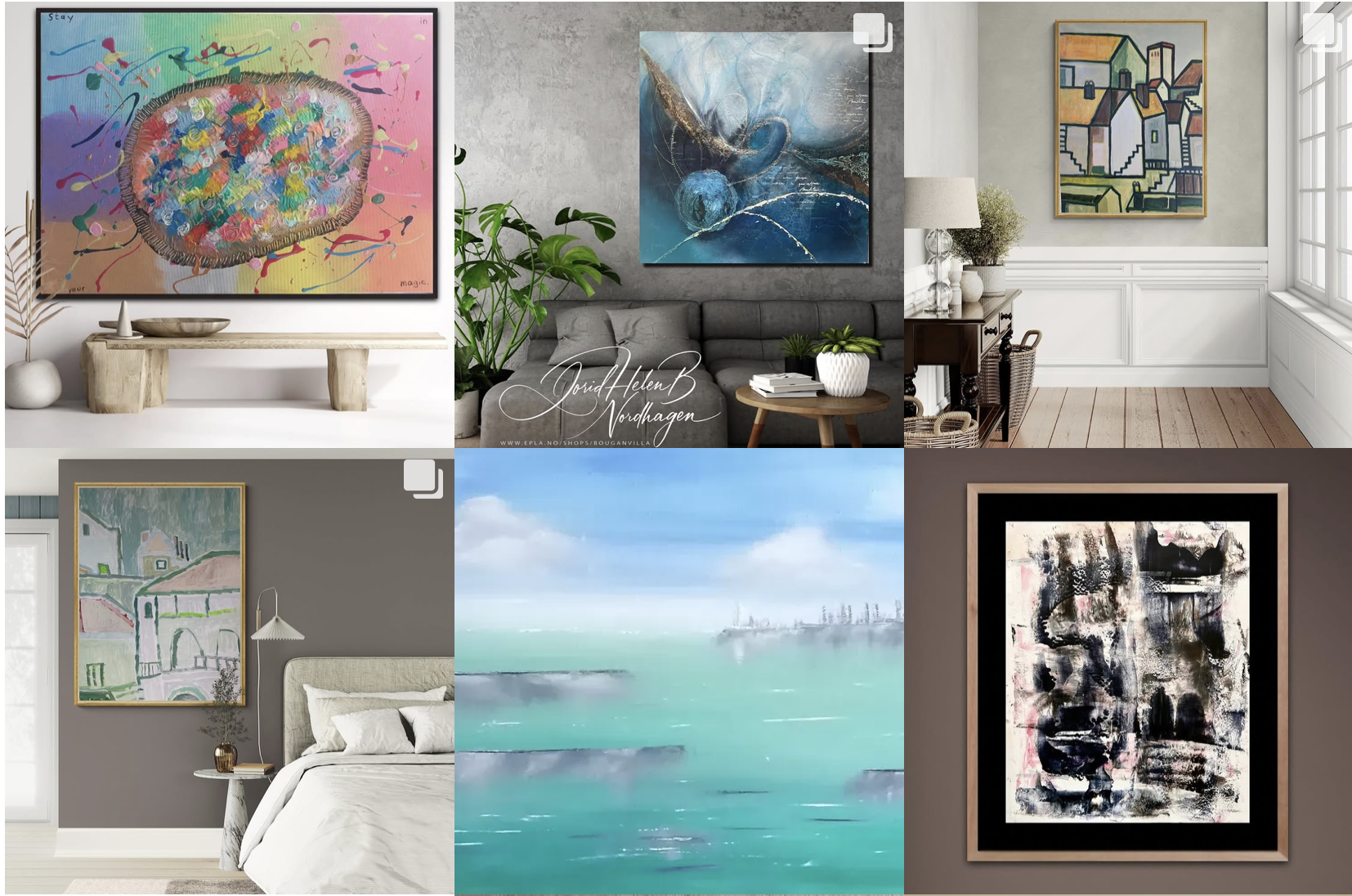
View Art on Your Wall: How to Preview Artwork Before You Buy or Hang It
Finding artwork you love is only part of the decision. The difficult question often comes next: how will this artwork actually look on my wall? A piece that looks perfectly proportioned on a website can feel surprisingly small, large or out of place once it is hanging in a real room.
Previewing art on a wall before you buy, print or hang it can help you judge scale, placement, colour and the relationship between the artwork and the surrounding space. Artists can use the same tools to show potential buyers how their work could look in a home.
Why Preview Artwork on Your Wall?
Dimensions alone can be difficult to visualise. A 60 × 90 cm artwork may sound large until you see it above a wide sofa. A smaller work may be perfect for a narrow wall but disappear visually in a large open room.
A wall preview can help you:
- Compare different artwork sizes before ordering or printing
- Decide how high or low to position a piece
- See whether the proportions suit the wall and nearby furniture
- Compare portrait, landscape and square formats
- Consider how the artwork's colours interact with the room
- Feel more confident before buying or hanging a piece
How to Preview Art on a Wall
There are two particularly useful approaches: creating a realistic room preview and using augmented reality to view artwork directly in your own space. They solve slightly different problems.
1. Create a Realistic Room Preview
A room mockup places an image of the artwork into a prepared interior. This is useful when you want a polished presentation for a portfolio, online shop, social media post or client proposal.
The key is realistic scale and positioning. The artwork should relate naturally to the furniture and architecture rather than looking as though it has simply been pasted onto the wall.
2. View Artwork on Your Own Wall With AR
If you want to understand how a piece could look in a specific room, augmented reality provides a more personal preview. InsituArtRoom's View in your room feature lets artwork be visualised on a real wall, helping the viewer assess the piece in the context that matters most: their own space.
For a deeper explanation of this technology, see our guide to augmented reality for artists.
See Artwork in a Real Space
Use InsituArtRoom to create realistic room presentations or preview artwork on a real wall with View in your room.
Try InsituArtRoomHow to Choose the Right Artwork Size for a Wall
Start by looking at the wall as a whole rather than considering the artwork in isolation. Furniture, ceiling height, doors, windows and surrounding objects all affect how large a piece feels.
If the artwork will hang above furniture, compare its width visually with the furniture below it. If it will occupy an empty wall, consider how much negative space you want around the piece. A preview makes these relationships much easier to judge than measurements alone.
Check Scale Before You Buy
One of the biggest advantages of visualising artwork before purchasing is the ability to test scale. Online product photographs can make it difficult to understand the true dimensions of a piece because there is often no familiar object nearby for comparison.
When creating a digital preview, use the actual dimensions whenever possible. Accurate proportions make the result more useful and reduce the risk of choosing a size based on an unrealistic visual.
Test Different Positions on the Wall
Sometimes the artwork is the right size but the placement is wrong. Moving a piece slightly higher, lower or to one side can change the balance of the entire wall.
Try more than one position before deciding. If you are arranging several pieces together, test the complete composition digitally before making holes in the wall.
Consider the Frame as Part of the Preview
A frame changes the overall dimensions and visual character of an artwork. A dark frame can create stronger contrast, while a lighter or more minimal frame may blend more gently into the room.
When possible, preview the artwork with a frame similar to the one you intend to use. This gives you a more realistic impression of the finished piece rather than judging the image alone.
Preview Different Artworks in the Same Room
If you are choosing between several pieces, place each one in the same room and at approximately the same scale. This makes comparison much easier because the environment remains constant.
You may discover that the artwork you preferred as an isolated image is not the one that works best in the space. Another piece may complement the proportions, colours or atmosphere of the room more naturally.
How Artists Can Use Wall Previews to Sell Art
Wall previews are not only useful for buyers. Artists can use them to give potential collectors more context. A photograph of the artwork documents the piece, while a realistic room presentation helps communicate how it might live in a home, office or gallery.
Artists can use wall previews for:
- Online art listings
- Portfolio presentations
- Instagram and other social media content
- Collector conversations
- Email campaigns
- Exhibition or gallery proposals
If you are preparing images specifically to market your work, our guides to art mockups for artists and promoting artwork online offer more ideas.
Room Mockup or Augmented Reality: Which Should You Use?
You do not necessarily need to choose one. A prepared mockup is ideal when the artist wants control over the presentation and needs a polished image to share publicly. AR is more useful when the viewer wants to see the artwork in a particular real-world space.
For example, an artist might post a carefully styled room mockup on Instagram and then let an interested collector use View in your room to visualise the same piece on their own wall.
Common Mistakes When Previewing Artwork
- Ignoring the real dimensions. An attractive preview is less useful if the scale is impossible.
- Choosing a room that overwhelms the artwork. The art should remain the focus.
- Forgetting perspective. Artwork on an angled wall should follow the wall plane naturally.
- Judging colour too precisely from a screen. Displays and lighting conditions can change how colours appear.
- Using only one preview. Testing several sizes or placements can reveal a better option.
For angled walls and more complex interiors, read our guide to realistic art mockups with perspective and scale.
Preview Art Before Making the Final Decision
A digital preview cannot replace seeing a physical artwork in person, but it can answer many practical questions before you commit. You can compare scale, test placement, consider framing and understand how the piece relates to a room.
For artists, the same process creates stronger visual material for presenting work to collectors. For buyers, it can make the jump from “I like this artwork” to “I can imagine this artwork in my home” much easier.
Preview Artwork Before You Hang It
Create room mockups with InsituArtRoom and use View in your room to visualise artwork on a real wall.
Start previewing artwork