Art Preview Tool: Visualize Your Artwork on a Wall
An art preview tool helps you see how artwork could look on a wall before you create a final presentation, publish a sales listing or share the piece with potential buyers. Instead of showing only a flat artwork image, you can place the work into a room and give viewers a clearer sense of its scale and visual impact.
For artists selling online, this solves an important problem: buyers often like an artwork but struggle to imagine how it would look outside the screen. A realistic wall preview can make that connection easier.
In this guide, we explain how to preview art on a wall, what makes a preview believable, how room previews differ from augmented reality and how InsituArtRoom can help you create both.
What Is an Art Preview Tool?
An art preview tool is a digital tool that places an image of an artwork into a visual environment. For wall art, this usually means displaying a painting, print, photograph or illustration on a wall inside a home, office, gallery or other interior.
The purpose is not to replace photographs of the actual artwork. A preview adds context. It helps the viewer understand how the work might relate to a wall, furniture and the surrounding space.
Why Preview Artwork on a Wall?
When people view artwork online, they cannot experience its physical scale in the same way they would in a gallery. A 40 cm print and a 140 cm painting can occupy a similar amount of space on a phone screen even though they would feel completely different in a room.
A wall preview can help communicate:
- Approximate visual scale
- How the artwork relates to furniture
- How different wall colours affect the presentation
- How a frame or mat changes the overall look
- Which types of interiors complement the piece
- How the artwork could function as part of a real space
How to Preview Your Art in a Room
1. Start With a Good Artwork Image
Use a clear, straight photograph or scan of the artwork. Avoid strong reflections, visible perspective distortion and uneven lighting. The better the source image, the more convincing the room preview will be.
If you need help preparing your images, see how to photograph artwork.
2. Choose an Appropriate Interior
Select a room that supports the artwork rather than competing with it. Think about wall colour, interior style, furniture and the amount of open wall space.
Different pieces may benefit from different environments. Avoid automatically placing every artwork in the same neutral living room.
3. Keep the Artwork's Original Proportions
Never stretch or compress the image to make it fit a particular wall. A preview should represent the artwork honestly.
4. Set a Believable Scale
Use furniture, doors and architectural elements as visual references. If you know the real dimensions of the artwork, let those dimensions guide the presentation.
5. Check Position and Spacing
Artwork placed too high, too low or too close to furniture can make a preview feel unrealistic. Small adjustments to position can make a large difference.
How InsituArtRoom Works as an Art Preview Tool
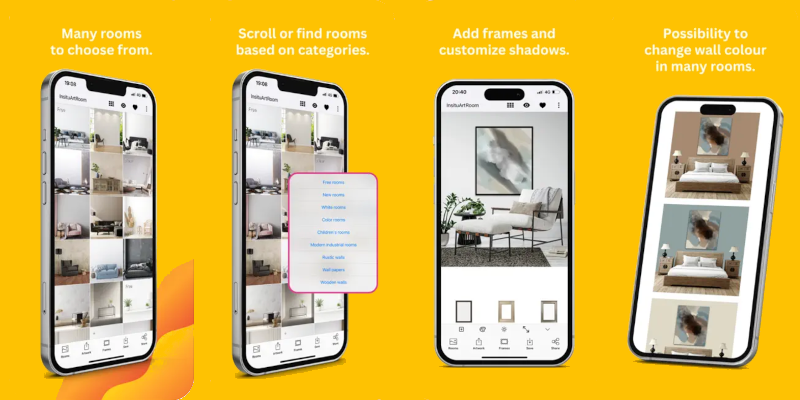
InsituArtRoom is designed for artists who want to create artwork presentations without building every room scene manually in image-editing software.
Upload your artwork, select an interior, position and scale the piece, and explore different presentation options. InsituArtRoom includes 9 free interiors, while Premium gives access to the larger interior collection.
The resulting previews can be used on artist websites, portfolios, social media, promotional material and online sales pages.
Preview Your Artwork in a Room
Upload your artwork to InsituArtRoom, choose an interior and create a realistic wall preview in minutes.
Try InsituArtRoomArt Preview Tool vs Art Mockup Tool
The terms overlap, but they can describe slightly different intentions. An art mockup usually refers to the finished visual presentation of artwork in a prepared scene. An art preview emphasises the process of checking how the work looks in a space.
In practice, artists often use the same tool for both. You may first preview several rooms, sizes or frames, then export the strongest version as a mockup for your portfolio or marketing.
For more on the presentation side, read our guide to using an art mockup tool.
Art Preview Tool vs Augmented Reality
A prepared room preview shows artwork in an interior selected by the artist. Augmented reality works differently: it lets the viewer visualise artwork in their own environment.
InsituArtRoom's View in your room feature uses AR so viewers can explore how artwork might look on a real wall. That can be particularly useful later in the buying journey, when someone is considering a specific piece for a specific space.
Learn more in our guide to augmented reality for artists.
Preview Different Frames Before Choosing a Presentation
Framing changes how artwork interacts with a room. A dark frame can create strong contrast, while a lighter frame or mat may give the work more visual space.
InsituArtRoom includes presentation options such as metal frames, floating frames and cream mats, allowing you to experiment with different looks before creating your final marketing image.
If the artwork is sold unframed, make that clear to buyers even if you use a framed preview for visual inspiration.
Use Room Previews to Show Scale to Buyers
Written dimensions should always be included in a sales listing, but a contextual preview can make those numbers easier to understand. A buyer can compare the artwork visually with a sofa, desk, bed or dining table.
This is especially helpful when selling larger paintings or prints in several sizes. Keep the presentation realistic so the preview supports the dimensions rather than contradicting them.
Use Art Previews in Your Portfolio
A portfolio should primarily show the artwork clearly, but selected room previews can add context and variety. They are useful when you want to demonstrate how a piece works at scale without physically installing it for a photo shoot.
Combine clean artwork images, detail shots and contextual presentations rather than filling the entire portfolio with interiors.
For more guidance, see how to make an art portfolio.
Use Art Previews for Social Media
A room preview can turn an artwork you have already shared into a new piece of content. You can show the same work in different settings, compare framing options or ask followers which room they prefer.
InsituArtRoom also lets artists turn artwork presentations into vertical Reels using motion effects such as Zoom In, Zoom Out and Bird's Eye.
See how to make art Reels for Instagram for a practical workflow.
Can an Art Preview Help You Sell Art Online?
A preview cannot guarantee a sale, but it can provide useful information that a flat image alone may not communicate. It helps viewers understand context and gives them another way to imagine the work as a physical object.
For the strongest sales presentation, combine previews with accurate photographs, dimensions, medium, price, framing information and a useful description.
See how to sell art online and how to write an artwork description.
Preview Art in Different Types of Rooms
The best environment depends on the artwork and the audience. A bold contemporary painting might suit a large living space, while a smaller print could be easier to understand above a desk or console.
For room-specific ideas, explore our guides to living room wall art mockups, office wall art mockups and dining room wall art mockups.
Common Art Preview Mistakes
- Changing the artwork's proportions
- Making the artwork unrealistically large
- Using a low-resolution source image
- Choosing a room that distracts from the work
- Positioning the artwork at an implausible height
- Using only previews and no photographs of the actual artwork
- Showing framing that could mislead buyers about what is included
- Using exactly the same room for every artwork
What Makes a Good Art Preview?
A good preview looks believable without drawing attention away from the artwork. The piece keeps its original proportions, its size makes sense in relation to the room and the interior supports the artwork rather than becoming the main subject.
It should also serve a clear purpose. A portfolio preview may prioritise visual presentation, while a sales preview should prioritise useful context and accuracy.
Art Preview Checklist
- Use a high-quality image of the real artwork
- Keep the original proportions
- Use believable scale
- Choose an interior that complements the piece
- Check wall position and spacing
- Experiment with frames when relevant
- Keep sales information accurate
- Combine previews with real artwork photographs
- Use AR when viewers want to visualise art in their own room
Visualize Your Artwork on a Wall
Create realistic room previews, explore different presentations and let viewers experience your artwork in new ways with InsituArtRoom.
Preview Your ArtFinal Thoughts
An art preview tool gives artists a practical way to see and show artwork in context. It can help you test rooms and framing, create portfolio visuals, produce social content and give potential buyers a clearer idea of how the work might look on a wall.
The most effective previews remain realistic. Use accurate artwork images, preserve the original proportions and choose believable scale. Then combine prepared room previews with AR when you want viewers to go one step further and visualise the artwork in their own space.